
Do you want to become a Meesho seller but don’t know where to start? Then you are at the right place.
Meesho has become one of the largest marketplaces for small and mid-sized sellers. The platform has a low barrier and a pretty simple setup when compared to others like Amazon, Myntra, and Flipkart. And GST is not mandatory, which makes entry all the easier.
If you want to sell on Meesho, there are certain things that you must know. New sellers often have many questions, like how to create a Meesho seller account, is GST mandatory, etc.
We get you, and we are here with answers.
This guide will solve all your queries and give you a clear direction to start your journey as a Meesho seller.
Meesho Seller Registration Requirements
First things first.
You need certain documents to be eligible for Meesho seller registration. These are listed below:
- PAN card. This can be in your name or your company’s name.
- GST number. Meesho requires GST for most product categories. Only a few segments, such as books and certain handicrafts, qualify for GST exemption. You can become a Meesho seller without GST as well. All you need is an EID (covered this later in the blog)
- Bank account details. This includes the account number and IFSC code. Payments are deposited directly into this account.
- Business address proof. This is used to set your pickup location. A utility bill, rental agreement, or any official document with your business address will work.
How to Sell Products on Meesho
Creating a Meesho Seller Account
New sellers often think that becoming a Meesho Seller is a daunting task. Well, it’s not. You can register yourself in under 5 minutes (we aren’t kidding!). Below is a step-by-step process (with pictures) to create a Meesho seller account.
- Visit Meesho supplier account and click on “Start Selling.”
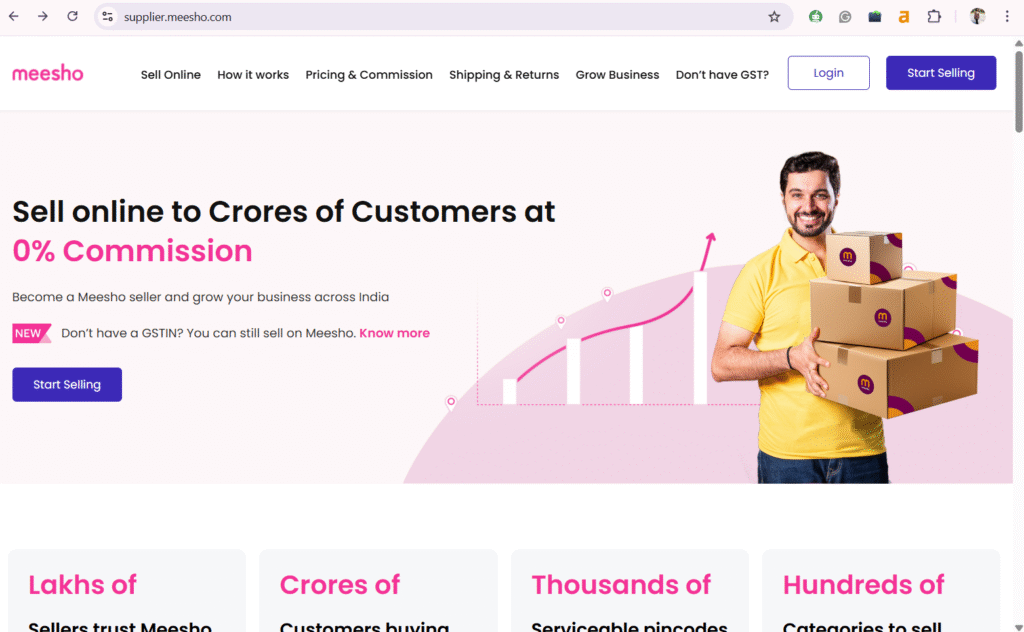
- Enter your phone number. You will receive an OTP. Enter it in the box and click on “Create Account.”
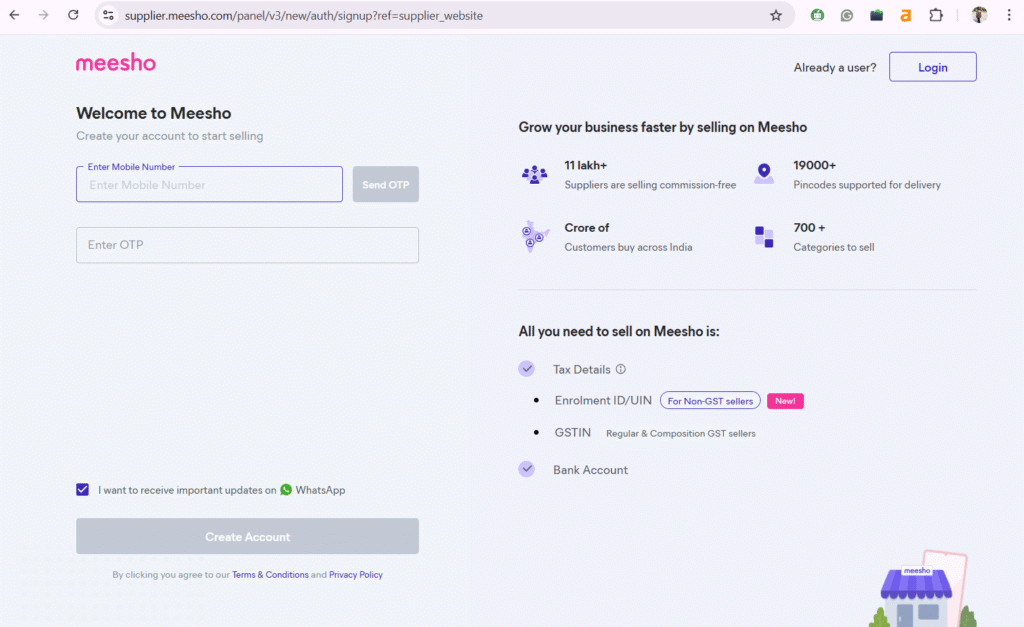
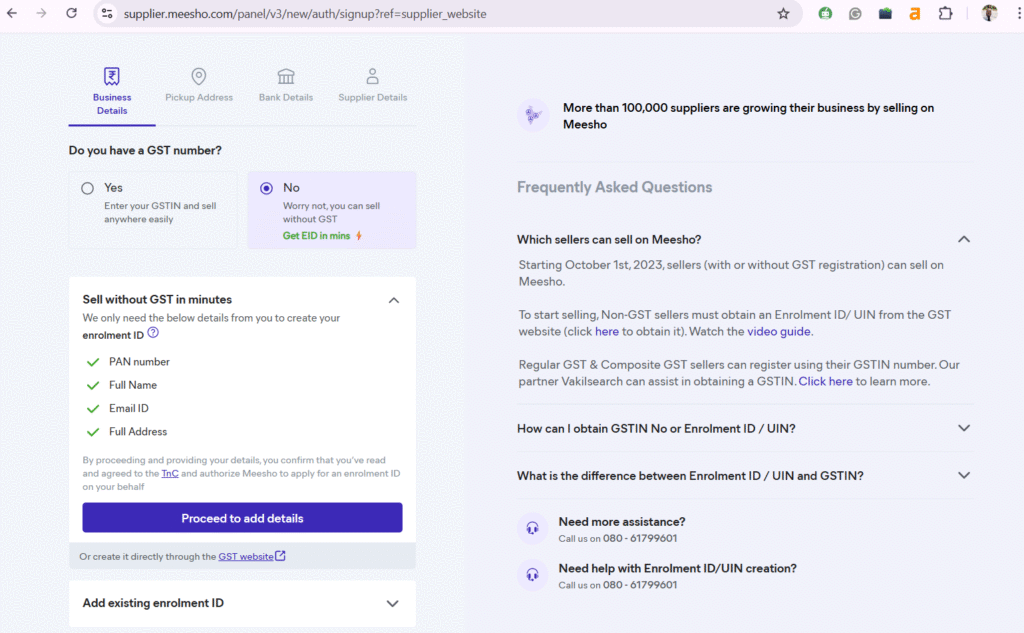
- You get two options now. Create an account with GST or without GST. If you have GST, click on “Yes,” and enter your GST number. Then click on continue.
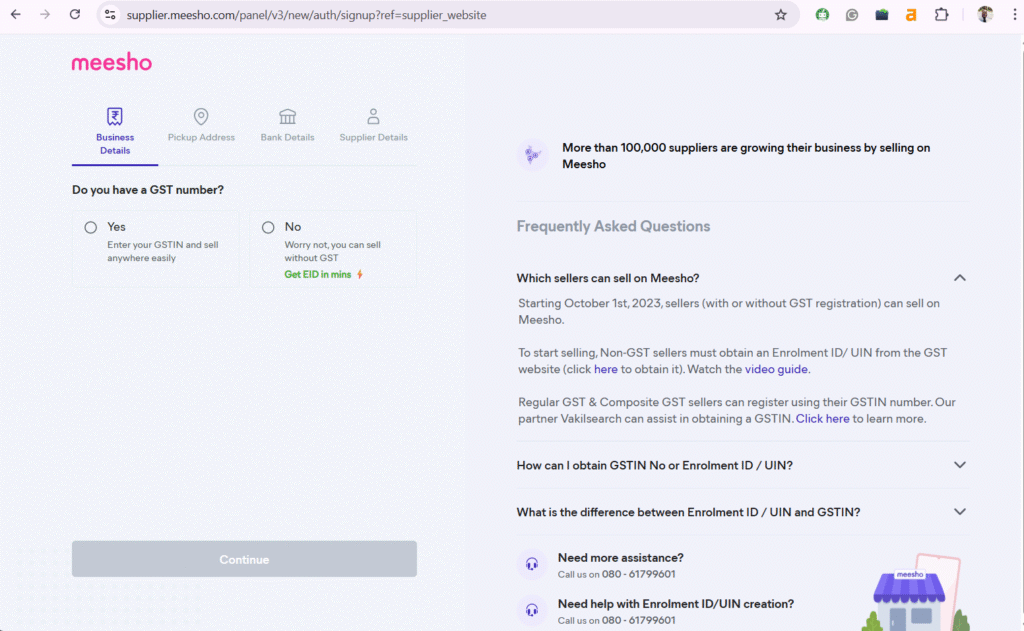
- If you don’t have a GST number, simply click on “No.” You will see the option to create an enrollment ID (EID). Click on “Proceed to add details” to create your EID.
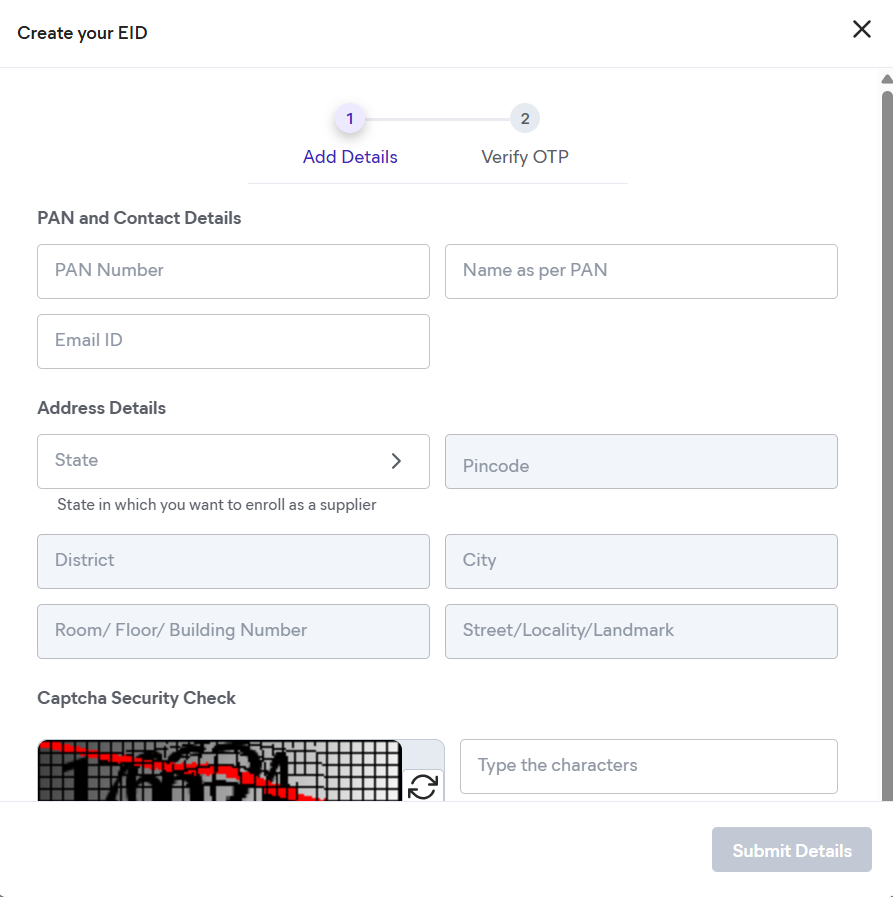
- Add all the required details and hit “Submit Details.” You will receive one OTP on your phone number and another on your email. Add both to verify your phone number and email address.
- Now you need to add your pickup address, bank details, and details about the business. Once you add these, you are done.
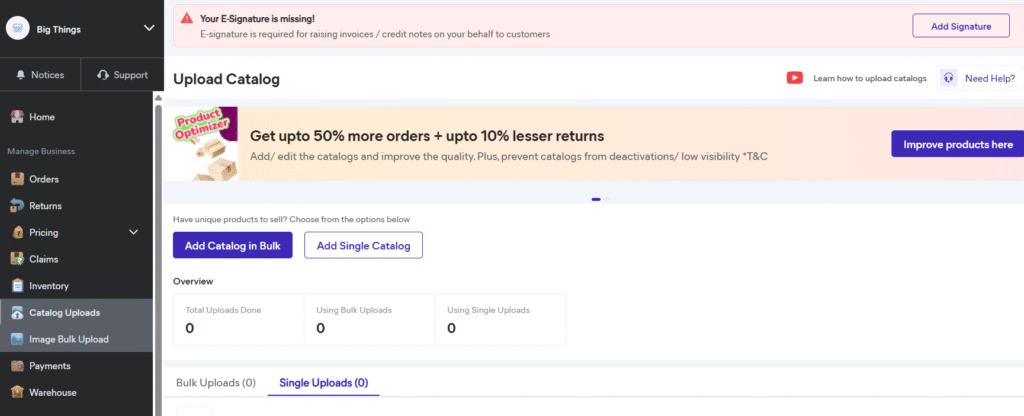
- Your Meesho seller account is created. You will see a dashboard like this. It’s usually called Meesho seller hub or Meesho seller central.
B. Upload Your Catalog
Creating your Meesho seller account is the first step for selling on Meesho. The real work begins from here. Now, you need to upload your product catalogs. Meesho provides you with two options: add a single catalog or upload catalogs in bulk.
You can watch the full tutorial on adding a single catalog in Meesho. And if you want to upload catalogs in bulk.
You must keep some things in mind while uploading products on Meesho, like
- Choosing the right categories
- Using short and descriptive titles
- Writing clear descriptions
- Keeping prices competitive
- Adding quality images
C. Managing Orders and Inventory
Each order will appear in your seller dashboard. You need to confirm the order within the given time. After confirmation, you need to prepare the product for pickup. The courier partner will collect it from your address and handle delivery.
Once the order is packed, you have to attach the shipping label generated in the dashboard. The pickup agent scans the parcel and updates the status. Tracking details are shared automatically with the buyer.
When you sell on Meesho, you will also deal with returns. When a customer requests a return, the platform arranges pickup and sends the item back to you. You also have to maintain your stock levels. If a product goes out of stock, mark it accordingly. Correct stock management helps you avoid cancellations.
You can watch this Manage Product Inventory on Meesho to learn more about inventory management.
How Payment and Commission Work on Meesho
Meesho is popular among small and mid-sized businesses for its simple system that helps them keep the majority of their earnings.
Zero Commission Structure
Meesho does not charge any commission on sales. This applies to every product category. Sellers keep the full profit from each order. A seller doesn’t have to worry about penalties for cancellations or late dispatches as well.
Payment Cycle
Payments are processed every 7 days after an order is delivered. This schedule covers both prepaid and Cash on Delivery orders. The settlement amount is transferred directly to the bank account linked to your seller profile.
Logistics and Deductions
Meesho handles pickup and delivery for all orders. Shipping fees are the main deduction from your earnings. These fees depend on parcel weight and destination, and they include 18% GST. If a product is returned, the value of the returned item is adjusted in your next settlement.
Some Tips to Become a Successful Meesho Seller
Anyone can become a Meesho Seller, but not everyone can be a successful one. Meesho has lakhs of sellers, and the competition is rising. So, how will you grow your business on Meesho?
Below are some very simple tips that you can use to sell on meesho and grow your business.
Use Relevant Keywords
Buyers often search with short and direct phrases. Use these terms in your titles and descriptions so the platform understands where to place your products.
Keep Pricing Competitive
You should check the prices of other products in your category to identify a fair price range. A small adjustment in price can improve your conversion rate without reducing your margin too sharply.
Refresh Your Catalog
Add new products whenever possible. A fresh catalog attracts more visitors and increases your chances of reaching trending categories.
Ship Orders Quickly
Confirm orders on time and prepare packages without delay. Fast handling leads to better ratings and greater trust among buyers.
Encourage Customer Feedback
Good reviews help your catalog stand out. Buyers often look at ratings to decide whether to purchase or not.
Common Mistakes New Meesho Sellers Should Avoid
New Meesho sellers often get low sales because of some common mistakes. If you avoid these, you can improve your performance from the start.
Incorrect or Incomplete Listings
Missing details or unclear titles often lead to poor visibility. Make sure each listing includes size charts, material information, and accurate photos.
Unrealistic Pricing
Setting prices far above or below the average can affect your sales. Buyers compare similar products, so stay within the common range while keeping your margins safe.
Slow Order Handling
Delays in confirmation or packaging may lead to cancellations. A consistent routine for checking your dashboard helps you stay on track.
Ignoring Packaging Quality
Weak packaging increases the chance of damage. Invest in sturdy materials that protect the product during travel.
Not Tracking Stock Levels
If your stock is not updated, you may receive orders you cannot fulfil. This leads to cancellations and affects your seller rating.
Summing Up!
Becoming a Meesho seller is pretty simple. The platform requires only basic documents and lets you set up your seller account in a few minutes. After registration, you upload your catalogs, choose the right categories, add clear titles and descriptions, and keep your pricing competitive. Meesho follows a zero-commission model. You keep your full profit from each sale. New sellers must avoid the common mistakes listed above to grow their business on Meesho.
If you want to become a Meesho seller and grow your business online, Ecom Dignity is here to help you. We offer expert Meesho Account Management Services in India, right from registration to product listings. Join hands with us for a seamless Meesho seller journey. Contact us right away!
FAQs
1. How to register in Meesho as a seller?
The Meesho seller registration process is pretty simple. Visit https://supplier.meesho.com/ to create your account. You can create your account with GST or without GST. If you don’t have GST, you need to create an EID. for that you need your PAN card, email ID, and address.
2. How to sell in Meesho without GST?
GST is not mandatory to sell on Meesho. But you need an EID in lieu of GST. For that you just need your PAN card, email, and complete address. Then just add your bank details, pickup address, and business details, and you are good to go.
3. How much does it cost to register as a Meesho seller?
It costs zero to register as a Meesho seller. You can become a Meesho seller absolutely for free.
4. Is it profitable to sell on Meesho?
Yes. Meesho has 0% commission on all product categories, so you get to keep the full amount. You must also fulfill all orders timely to avoid any penalties.

Siddharth Dwivedi is an eCommerce consultant and entrepreneur specialising in marketplace growth, online business strategy, and digital commerce operations. With hands-on experience in Amazon, Flipkart, and Shopify ecosystems, he works closely with brands and sellers to improve visibility, optimise listings, and scale profitable online operations. Through his blogs, Siddharth shares practical insights, strategies, and real-world learnings to help businesses grow sustainably in the evolving e-commerce landscape.

Thank you so much for providing the Meesho-related information. I really appreciate your support.”