

How to Sell on Flipkart Step-by-Step Seller Guide for 2026
Are you thinking of selling on Flipkart but don’t know where to start? Then you have come to the right place.
Flipkart is one of the most popular shopping platforms in India. Flipkart’s Big Billion Days is no less than a festival. Indian sellers must have a presence on Flipkart to reach millions of buyers. But sellers often struggle to register on the platform, gather the necessary documents, and create product listings.
That’s why we have created this guide. We will walk you through everything: who is eligible, what documents you need, the full Flipkart seller registration process, how to sell on Flipkart without GST, what fees to expect, and how to actually grow once your account is live. By the end, you will know exactly what to do — step by step — to start selling on Flipkart in 2026.
And if you are looking for a shortcut, then just get in touch with Ecom Dignity, a leading Flipkart account management company.
Key Takeaways
- Flipkart seller registration is free, done entirely online at seller.flipkart.com, and can be completed in about 10–15 minutes if you have your documents ready.
- Most product categories require a valid GSTIN, but Flipkart seller registration without GST is possible for a limited set of GST-exempt categories, such as certain books.
- You will need a PAN card, business proof, a pickup address, and bank account details to complete Flipkart seller account registration.
- Flipkart charges a combination of commission, a fixed fee, a collection fee, and shipping charges, all of which vary by product category and order value.
- Once registered, you can choose between self-ship and Flipkart’s fulfilment network, and use tools like Flipkart Ads, the Flipkart Assured badge, and seasonal sales to grow faster.
Why Sell on Flipkart in 2026?
Before we move to the registration process, it’s good to know why to sell on Flipkart in the first place. Below are some compelling reasons to become a Flipkart seller:
- Massive built-in audience
Flipkart is used by hundreds of millions of shoppers across India, including deep reach into tier 2 and tier 3 cities where many other online channels still have limited penetration. That gives new sellers access to demand they would otherwise have to spend years building on their own.
- Lower cost structure than several competing marketplaces
Flipkart’s commission and fixed-fee structure is generally competitive when compared with other major Indian marketplaces, particularly in categories like electronics and lifestyle products, which helps sellers protect their margins.
- Fast settlement cycles
Flipkart is known for relatively quick payment cycles once an order is dispatched, which supports healthier working capital for growing sellers.
- Fulfilment support
Through Flipkart’s fulfilment network, sellers can store inventory closer to buyers, which shortens delivery timelines and improves the shopping experience — a factor that directly affects conversion and search ranking.
- Sale-event visibility
Flipkart’s flagship sale events, including the Big Billion Days, consistently drive a sharp spike in traffic and orders for participating sellers, making them one of the biggest growth levers on the platform each year.
Who Is Eligible to Sell on Flipkart?
Flipkart is open to a wide range of seller types, which is part of why “how to sell products on Flipkart” is such a common search among first-time and experienced entrepreneurs alike. You are eligible to register as a Flipkart seller if you operate as:
- An individual seller or sole proprietorship
- A partnership firm or Limited Liability Partnership (LLP)
- A private limited company or registered corporation
Whatever your business structure, Flipkart requires that the products you list are new and genuine. Resale of used or counterfeit goods is not permitted on the platform. Depending on your category, you may also need category-specific approvals (for example, in categories like electronics, jewellery, or health products).
Documents Required for Flipkart Seller Registration
Having your documents ready before you start is the single biggest thing that speeds up Flipkart seller registration. Requirements vary slightly by business type.
Business Type | Identity / Business Proof | Address Proof |
Individual / Sole Proprietorship | PAN card, Aadhaar/passport/voter ID/driving licence | Utility bill, bank statement, or lease agreement |
Partnership Firm / LLP | Partnership deed, LLP incorporation certificate, PAN of the firm | Utility bill or lease agreement in the firm’s name |
Private Limited Company | Certificate of incorporation, MOA, company PAN | Utility bill, bank statement, or lease agreement |
In addition to the above, every seller, regardless of business type, will typically need:
- GSTIN (for most product categories)
- Bank account details, including account number and IFSC code
- A pickup address where couriers can collect inventory
- A digital signature (created or drawn during onboarding, no upload required)
Flipkart Seller Registration Without GST: Is It Possible?
One of the most common questions from new sellers is how to sell on Flipkart without GST. GST registration is a legal requirement for e-commerce sellers under Indian tax law for most goods, so for the overwhelming majority of categories, a valid GSTIN is mandatory — there is no turnover-based exemption the way there is for some offline traders.
That said, Flipkart seller registration without GST is possible in a narrow set of cases:
- Your products fall under a GST-exempt category. Certain categories, most notably unbranded books, do not require GST and can be listed using just a PAN card.
- You are selling exclusively exempted goods. If your entire catalogue falls under GST-exempt goods, you are not required to hold a GSTIN to register.
If you’re wondering how to sell products on Flipkart without a GST number for a specific product, the safest approach is to check the exact GST status of your category directly on the Flipkart Seller Hub before you begin registration, since exemption lists can change and are enforced strictly at the listing level.
For everything outside these exempt categories—like electronics, apparel, home goods, beauty, and most other mainstream categories—a GSTIN is required before you can list.
It’s also worth knowing that having a GSTIN comes with a practical upside even if you’re near the exemption threshold: it lets you claim Input Tax Credit (ITC) on your purchases, which can reduce your effective tax outgo and, in turn, let you price more competitively.
Flipkart Seller Registration Process: Step-by-Step
Here is the complete Flipkart seller registration process, from creating your account to publishing your first listing.
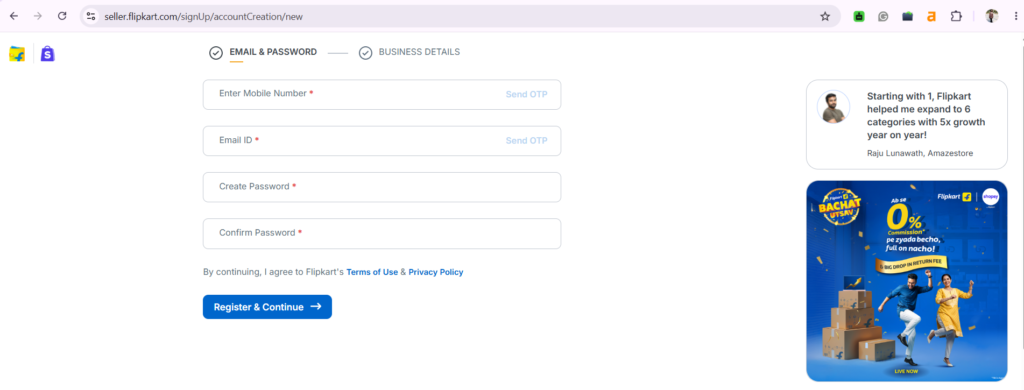
- Go to seller.flipkart.com and click on “Start Selling.” Enter your mobile number and verify it using the OTP sent. Then add your email ID and verify it using the OTP sent. Then set your password.
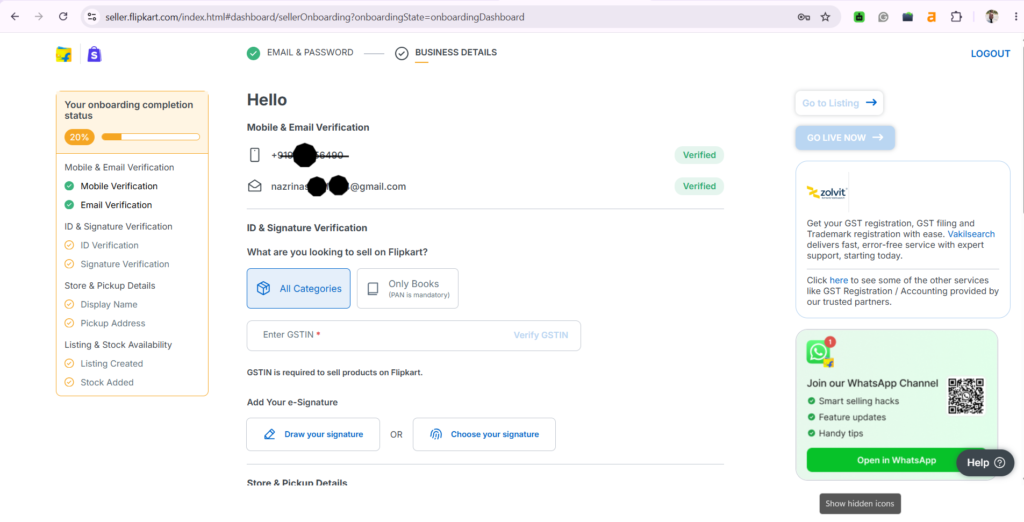
2. Next, you’ll be asked, “What are you looking to sell on Flipkart?” If you select “All Categories,” you’ll need to enter your GSTIN. If you select “Only Books,” PAN verification alone is sufficient — this is the main GST-free entry point for new sellers.
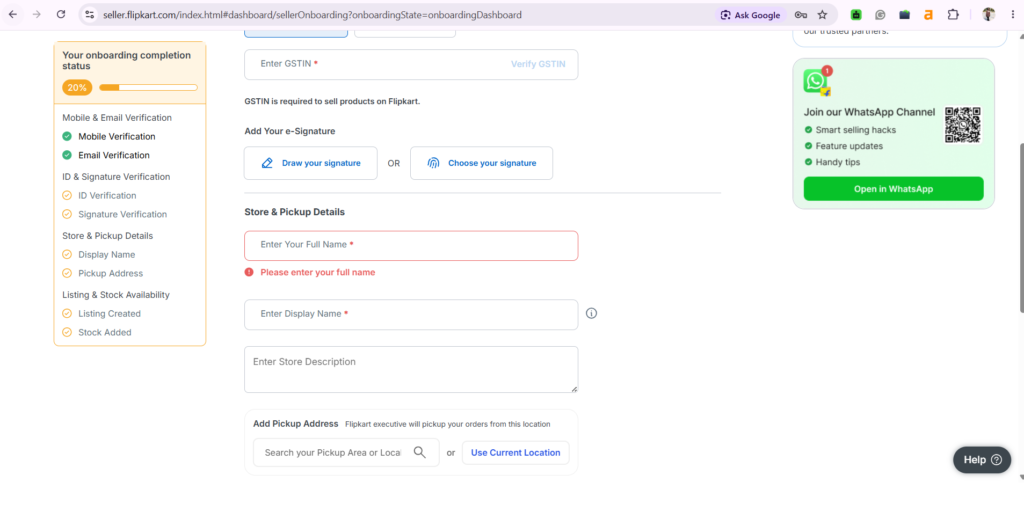
3. Add GSTIN (if you have), add e-signature, display name, store description, and pick up address. If you choose to sell only books, then add business name, business address, and pincode. To verify the address, you can upload any of the documents like Voter ID, passport, electricity bill, etc.
4. Enter your bank account number and IFSC code. These details should match the bank information linked to your GSTIN to avoid verification mismatches during settlement.
5. The last step in the process is to list your products. Click “Go to Listing,” choose “List your own products,” and fill in:
- Product title with relevant keywords
- Category (chosen carefully — miscategorized listings hurt discoverability)
- High-quality images from multiple angles
- A clear, benefit-led description
- Price, available stock, and shipping weight/dimensions
6. Once your first listing is submitted and approved, your Flipkart seller account registration is complete and your product can go live on the marketplace.
How to Sell Products on Flipkart: What Happens After Registration
Registration is actually the easy part. The real work of how to sell products on Flipkart starts after that. Here are some things to choose next:
Choose Your Fulfilment Model
Flipkart offers two core fulfilment paths:
- Self-ship (seller-fulfilled): You store, pack, and hand over orders to Flipkart’s logistics partner (Ekart) for delivery. This gives you more control but requires you to manage your own warehousing and SLA compliance.
- Fulfilment by Flipkart (FBF): You send inventory to Flipkart’s fulfilment centres, and Flipkart handles storage, packing, and delivery. This typically improves delivery speed and can boost your search visibility, since faster delivery is a ranking factor.
Get Your Category and Listing Right
List products under the most specific, accurate category available. A product listed in the wrong category won’t appear when shoppers filter by the correct one, which quietly kills visibility and can leave otherwise good products sitting as dead stock.
Price Competitively From Day One
Before you finalize a price, check what similar sellers are charging for comparable products, then factor in Flipkart’s commission, fixed fee, shipping cost, and GST on those fees. Pricing too high hurts conversion; pricing too low erodes margin—the goal is a price that’s competitive without leaving money on the table. You can use our Flipkart seller price calculator to set better prices.
Flipkart Seller Fees: What You'll Actually Pay
Flipkart’s fee structure is category-dependent, and understanding it upfront prevents pricing surprises later. Broadly, sellers pay four components on every order:
- Commission fee — a percentage of the selling price that varies by category (typically lower for categories like electronics and mobiles, higher for categories like fashion and jewellery).
- Fixed fee — a flat charge based on the order value slab.
- Collection fee — charged for handling the payment collection, whether prepaid or COD.
- Shipping fee — based on the product’s weight and the shipping zone (local, zonal, or national).
All of these fees attract GST, which is added on top. Flipkart also runs a reconciliation system that lets sellers match their order report, sales report, and settlement report against actual payments received, so any shortfall or mismatch can be caught and resolved quickly.
Because exact commission percentages are revised periodically and differ by sub-category, it’s worth checking the live fee card on your Seller Hub dashboard before finalizing prices, rather than relying on a number you saw elsewhere.
How to Grow Sales After You Start Selling on Flipkart
As we said earlier, creating a Flipkart seller account is the easier part. The difficult part is growing the account, bringing in repeated customers, and generating revenue. So, below are some ways that will definitely help grow your account:
- Run Flipkart Promotions. Bundle deals, “Buy 2 get 1,” and category-specific discounts help your listings stand out in a crowded search page.
- Aim for the Flipkart Assured badge. Products that meet Flipkart’s quality and delivery benchmarks earn this badge, which builds buyer trust and tends to convert better.
- Invest in Flipkart Ads. Sponsored placements at the top of search results or on relevant category pages can meaningfully increase visibility for new or underperforming listings.
- Maintain a strong performance score. Keep your procurement SLA tight, avoid stockouts, and process returns promptly. Flipkart’s ranking algorithm rewards consistently reliable sellers.
- Prepare early for sale events. Big Billion Days and similar flagship sales drive an outsized share of annual volume for many sellers. Inventory planning and pricing strategy should start weeks in advance, not days.
- Keep your listings updated. Refresh images, descriptions, and keywords periodically based on what’s actually converting, rather than setting a listing once and leaving it untouched.
Common Registration Issues and How to Fix Them
- “GSTIN Already Registered” error: This means your GSTIN is linked to an existing Flipkart account. Either use a different GSTIN or reach out to Flipkart’s seller support to resolve the conflict.
- Pickup pin code not serviceable: If your exact pin code isn’t listed as serviceable, register the nearest serviceable pin code instead, while ensuring your actual pickup address remains accurate and accessible.
- Listing not showing in search: This is almost always a category-mapping issue. Double-check that your product sits in the most relevant sub-category, not just a broadly similar one.
Summing Up!
So, this was our simple guide to sell on Flipkart. Learning how to sell on Flipkart isn’t complicated once you break it down: get your documents ready, complete the Flipkart seller registration process, list your first product carefully, and choose a fulfilment model that matches how you want to run your business.
From there, growth comes down to consistent execution, including competitive pricing, strong listings, reliable fulfilment, and smart use of Flipkart’s promotional tools. Flipkart’s scale, relatively fast settlement cycles, and marquee sale events make it one of the most valuable channels for Indian sellers in 2026. The opportunity is there for anyone willing to set the account up correctly and manage it consistently.
For sellers who want to grow their business on Flipkart, you can get in touch with the top Flipkart account management service providers. If you’re unsure whether to manage everything yourself or work with experts, our detailed guide on e-commerce account management services explains what these services include, their benefits, and how to choose the right provider for your business. It is a useful resource for sellers who want to scale their online business more efficiently.
Grow Faster on Flipkart with Ecom Dignity
Ecom Dignity help brands and sellers with end-to-end Flipkart account management, from registration and GST-compliant onboarding to listing optimization, Flipkart Ads management, and sale-event planning around events like Big Billion Days.
Whether you’re launching your first Flipkart seller account or trying to scale an existing one profitably, our team handles the operational heavy lifting so you can focus on your business. Ready to start selling on Flipkart the right way? Contact Ecom Dignity today and let’s get your account live and growing.
Frequently Asked Questions
Find answers to the most common questions about Myntra account management.
Visit seller.flipkart.com, click "Start Selling," and complete registration with your mobile number, GSTIN or PAN, business details, pickup address, and bank account information. The process usually takes under 15 minutes if your documents are ready.
Yes. Flipkart does not charge a fee to register as a seller. You only pay platform fees — commission, fixed fee, collection fee, and shipping — once you start making sales.
Yes, but only for a limited set of GST-exempt categories, such as certain unbranded books. For most product categories, a valid GSTIN is mandatory under Indian tax law, so check your category's exemption status on Seller Hub before assuming you qualify.
Outside of GST-exempt categories, you cannot list on Flipkart without a GSTIN. If your products don't fall under an exempt category, you'll need to complete GST registration first, since e-commerce sellers don't get a turnover-based exemption.
You'll need a PAN card, business proof (partnership deed, incorporation certificate, or individual ID depending on your business type), address proof, a GSTIN (for most categories), and bank account details.
Flipkart charges a category-based commission plus a fixed fee, collection fee, and shipping charges, all with GST added on top. Rates vary significantly by category, so check the live fee card in your Seller Hub dashboard for your specific product before pricing.
The registration form itself can be completed in around 10–15 minutes. Your account can go live shortly after, provided your GSTIN/PAN and bank details are verified without errors. \.

Siddharth Dwivedi is an eCommerce consultant and entrepreneur specialising in marketplace growth, online business strategy, and digital commerce operations. With hands-on experience in Amazon, Flipkart, and Shopify ecosystems, he works closely with brands and sellers to improve visibility, optimise listings, and scale profitable online operations. Through his blogs, Siddharth shares practical insights, strategies, and real-world learnings to help businesses grow sustainably in the evolving e-commerce landscape.