

JioMart Seller Registration How to Sell Products on the JioMart Seller Panel
Jiomart is a popular e-commerce platform that is owned by Retail Reliance. It was launched in 2019 and only focused on online groceries. But soon it expanded into other categories like fashion, home essentials, electronics, and lifestyle products by adopting a marketplace model.
Jiomart has become a popular option among online sellers who want to expand into metro and smaller cities. The platform is less crowded and offers competitive commission rates. If you are considering selling on Jiomart, then this blog is for you.
Here, you will learn how to become a JioMart seller and how you can start selling products through the JioMart seller panel. It will cover eligibility, documentation, registration steps, and practical tips that matter once your account goes live.
Eligibility Criteria to Become a JioMart Seller
You need to have a registered business to become a JioMart Seller. It can be a proprietorship, partnership, private limited company, or LLP. Individual sellers without a registered business are usually not approved.
JioMart allows the sale of everyday categories like groceries, fashion, home essentials, electronics, kitchen items, and personal care. But the sale of some products is prohibited. These include products that are illegal, highly regulated, and those that need specific licenses.
A valid GST number is mandatory for selling on JioMart. The GST details must match the business name and address provided during registration.
Documents Required for JioMart Seller Registration
You need a few basic documents to create and verify your JioMart seller account. So, keep digital copies ready before you start.
Business Registration Details
You must share proof that your business is legally registered. It can be a proprietorship, partnership, or private limited company. You can use a shop act license, Udyam registration, or incorporation certificate. The business name must match your bank and tax records.
GST and PAN Requirements
A valid GST number is mandatory for selling on JioMart. The GST must be active and linked to your business name. You also need a PAN card. The PAN can belong to the owner or the registered business. Make sure the details match your GST records.
Bank Account and KYC Documents
You need a current bank account in your business name. Provide a cancelled cheque or bank statement for verification. Upload identity proof such as Aadhaar or PAN. Submit address proof if requested.
Once you upload these documents, JioMart reviews them before approving your seller account.
How to Become a Seller on JioMart
Follow the steps below to create your seller account on JioMart.
Step 1: Visit the JioMart Seller Portal
-
Go to the official JioMart Seller Portal.
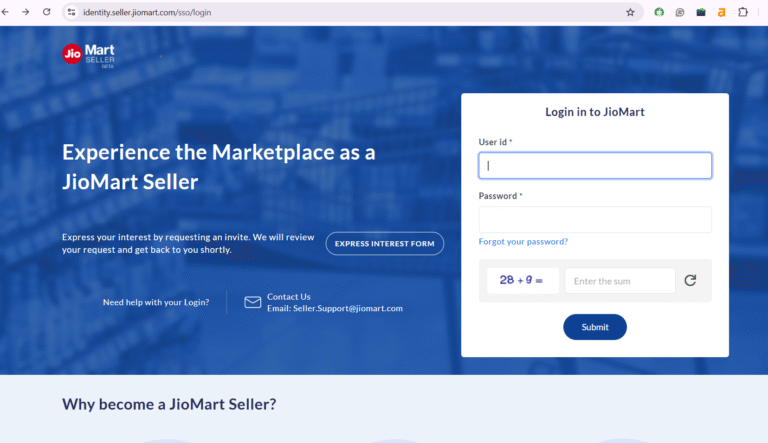
- Open the “Express Interest Form” to begin registration.
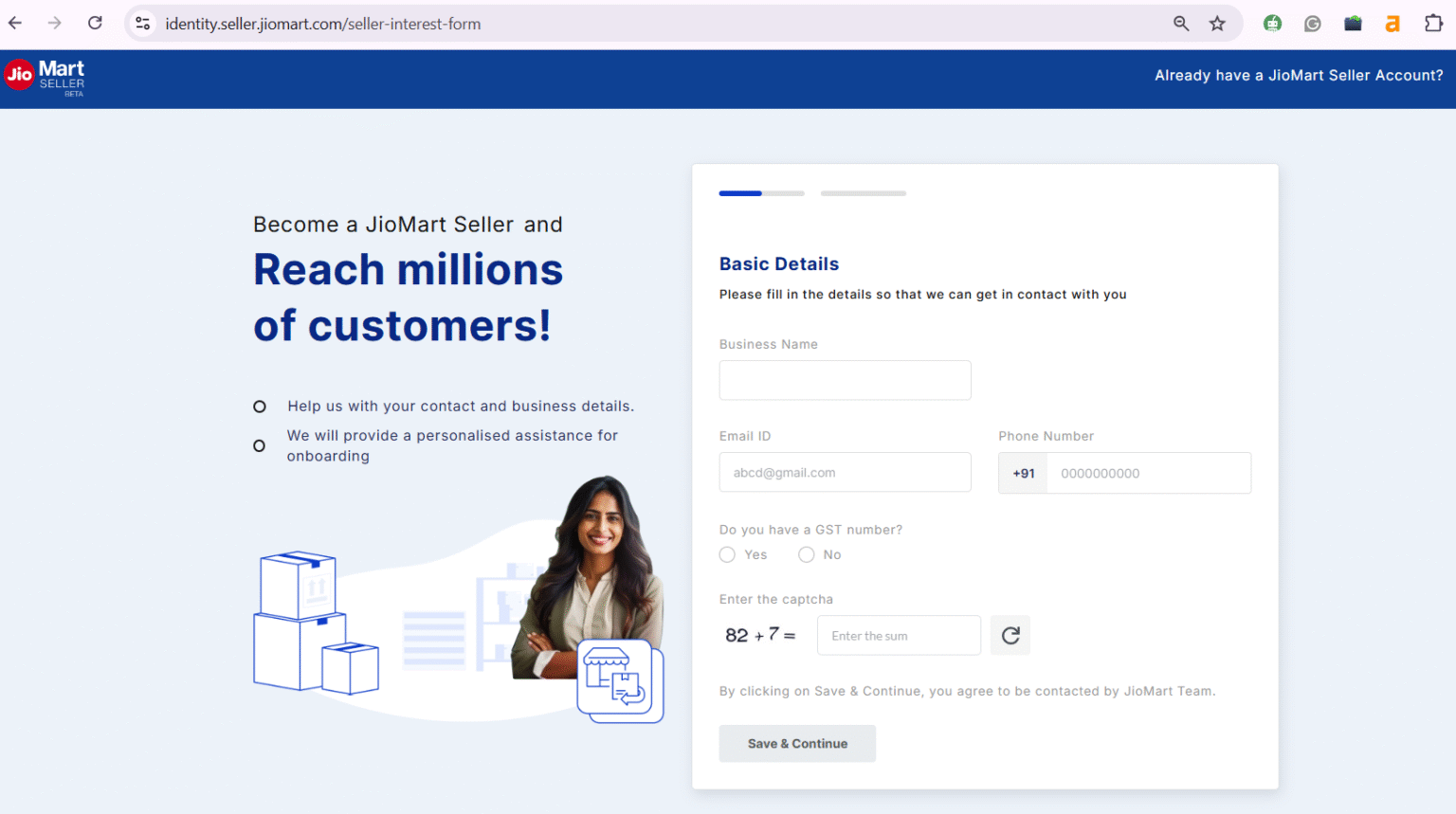
Step 2: Fill in Basic Business Information
- Enter your registered business name.
- Add a valid email ID for communication.
- Provide an active mobile number for verification.
- Select whether you have a GST number.
- Submit the form.
Step 3: Share Additional Business Details
- Confirm your business PIN code.
- Indicate if you have documents such as MSME or trademark registration.
- Select three to four product categories you plan to sell.
- Click the “Submit” button.
Step 4: Wait for Approval
- JioMart reviews your application. This may take a few days. If approved, you will receive an email from JioMart Seller Support. The email will contain a portal link and an invitation code.
Step 5: Accept the Seller Invitation
- Open the link shared in the approval email.
- Read the terms and conditions carefully.
- Accept the terms by checking the box.
- Enter the invitation code.
- Click “Submit.”
Step 6: Add Personal Details and Create Login
- Enter your name, email ID, and mobile number.
- Verify both using OTP.
- Click “Next.”
- Create a User ID and password.
- Confirm that you are the primary user.
- Click “Create Account.”
- You will reach the JioMart Seller Dashboard.
Step 7: Complete Company and Bank Details
- Enter your company PAN and validate it.
- Complete CIN validation if applicable.
- Provide business details such as turnover and business type.
- Add office details and GST number.
- Enter bank account details for payments.
- Upload a cancelled cheque for verification.
- Select three to five product categories under “My Categories.”
- Review commission details in the “Bill Plan” section.
- Upload all required documents.
- JioMart will verify your details and activate your account.
Step 8: JioMart Seller Login
- Visit the JioMart Seller Portal.
- Click on “Login.”
- Enter your User ID, password, and captcha.
- Access your seller dashboard.
Step 9: Add Products and Start Selling
- Go to the “Product” section in the dashboard.
- Click “Add Product.”
- Choose the product category.
- Enter the product title and description.
- Upload clear, high-quality images.
- Add weight, dimensions, MRP, and selling price.
- Include shipping and packaging details.
- Submit the listing for approval.
JioMart Fees and Commission Structure Explained
JioMart charges sellers based on the product category and the services they use. The total cost includes commission, order handling, shipping, and payment processing fees.
1. Commission Fee
JioMart Commission Rates
- Grocery and staples: 3% to 6%
- Electronics and accessories: 5% to 10%
- Fashion and apparel: 10% to 15%
- Home and kitchen products: 6% to 12%
- Personal care and beauty items: 8% to 12%
- Low-margin categories such as groceries usually have lower commission rates.
2. Closing Fee
JioMart applies a fixed closing fee to each successful order. This fee usually ranges from ₹10 to ₹50. The amount depends on the order value.
3. Shipping Charges
Shipping fees apply if you use JioMart’s delivery services. Charges depend on package weight and delivery location. Faster delivery options may cost more. You can go for self-shipping to reduce logistics costs.
4. Payment Processing Fee
JioMart deducts a payment processing fee on each transaction. This fee is usually around 2%. It covers payments made through cards, UPI, and net banking.
Always review the latest fee structure inside the JioMart Seller Dashboard before pricing your products. You can also use a JioMart price calculator to estimate your commission, fees, and final margin before listing.
Benefits of Selling on JioMart
Here are many benefits of selling on JioMart for new and growing online sellers.
- Access to a Large Customer Base
JioMart serves millions of customers across India. This helps sellers gain visibility without heavy marketing spend.
- Strong Brand Trust
JioMart operates under Reliance Industries. Customers trust the platform for quality and timely delivery.
- Low Entry Barrier
JioMart Seller registration is simple and cost-effective. There are no high setup fees. Small businesses can start selling with limited investment.
- Support for Local and Small Sellers
JioMart encourages regional and local brands. It gives small sellers a chance to compete with larger players.
- Integrated Logistics Support
Sellers can use JioMart’s delivery network. This reduces the effort needed to manage shipping and returns.
- Simple Seller Dashboard
The JioMart seller panel is easy to use. Sellers can manage orders, inventory, payments, and reports in one place.
- Category-Based Commission Structure
Commission rates on Jiomart differ by product category. Low-margin products often attract lower fees.
- Growing Demand in Grocery and Daily Essentials
JioMart performs well in groceries and essentials. This creates steady demand and repeat orders.
Let’s Sum Up!
Becoming a JioMart seller will allow you to reach customers across India. The JioMart seller registration process is pretty simple. You must have the required documents listed above to create your account.
The commission rates of JioMart are pretty reasonable when compared to other platforms. You can sell everyday products and grow your business. Running the account day to day — listings, pricing, inventory, and returns — is the ongoing work of e-commerce account management.
If you are still confused about how to sell on JioMart, then Ecom Dignity is here for you. We are India’s number 1 JioMart account management service provider. Contact us right away to book your free strategy call!
Frequently Asked Questions
Find answers to common questions about JioMart seller account.
Becoming a JioMart seller is pretty simple. Go to the official JioMart Seller Portal. Click on the “Express Interest Form” and fill in the required details. Once you do that, JioMart will approve your application and send an email with an invitation code and portal link. Open the link and complete the next details.
No, you can’t sell on JioMart without a GST number.
JioMart has different commission rates as per product categories. Grocery and staples has a rate between 3% and 6%, electronics and accessories has 5% to 10%, etc.
You need PAN details, GST number, bank account details, and business registration details to register on JioMart.

Siddharth Dwivedi is an eCommerce consultant and entrepreneur specialising in marketplace growth, online business strategy, and digital commerce operations. With hands-on experience in Amazon, Flipkart, and Shopify ecosystems, he works closely with brands and sellers to improve visibility, optimise listings, and scale profitable online operations. Through his blogs, Siddharth shares practical insights, strategies, and real-world learnings to help businesses grow sustainably in the evolving e-commerce landscape.